What you will learn
- Effective AI image prompts begin with a communication objective, placement, audience, and visual hierarchy—not a list of style adjectives.
- A modular prompt system separates fixed brand rules from variables such as subject, composition, format, light, and campaign concept.
- The twenty templates cover the highest-value marketing placements and include review criteria for accuracy, accessibility, consistency, and rights.
01
Why professional AI image prompts start before the prompt
A marketing visual has a job. It may stop a scroll, clarify a product benefit, create recognition, support a headline, demonstrate a workflow, or help a reader compare options. If that job is undefined, an image model can produce an attractive result that contributes nothing to the campaign.
Begin with a creative brief containing the audience, objective, single message, placement, dimensions, surrounding copy, required product facts, brand rules, and success signal. The generation prompt translates that approved brief into visual direction; it should not invent the strategy.
This approach also improves review. Instead of asking whether an image looks good, the team can ask whether the focal point, composition, claim, safe zone, format, and brand cues satisfy the brief.
02
Use a model-agnostic visual prompt structure
A portable image prompt can be organized as purpose, subject, action, environment, composition, viewpoint, lighting, palette, materials, style, mood, format, text requirements, and exclusions. Put the communication goal and important subject details first. Keep tool-specific controls in a separate settings layer.
Be concrete where accuracy matters. Define the product color, number of objects, camera angle, space reserved for copy, background complexity, and aspect ratio. Leave room for interpretation where variation is useful. A longer prompt is not necessarily better; every phrase should change a decision the model must make.
When text must be exact, consider adding it later in a design tool. Image models have improved text rendering, but precise spelling, alignment, localization, and brand typography still require inspection.
03
Separate fixed brand rules from creative variables
Fixed elements can include product identity, approved palette, logo treatment, photography language, accessibility rules, prohibited imagery, legal requirements, and the amount of clear space around the subject. Creative variables can include setting, supporting objects, viewpoint, light, texture, crop, and campaign metaphor.
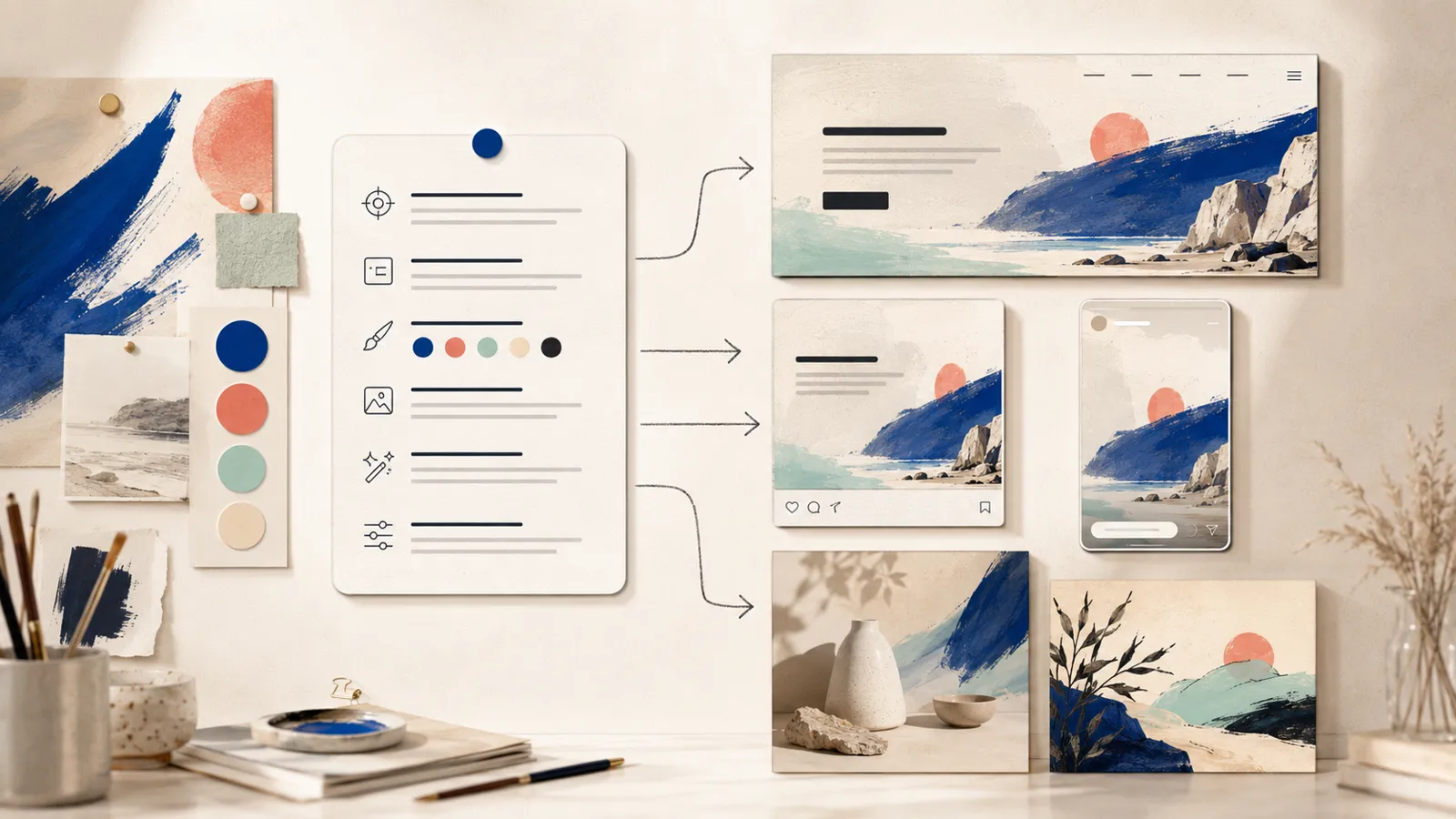
Document this split in a visual system. A campaign can explore several concepts without changing the product or becoming unrecognizable. The same concept can then be adapted into a website hero, square social post, vertical story, display ad, and article image while preserving its central visual idea.
04
Control composition for the real placement
State the format and intended crop. A 16:9 website hero needs room for a heading and call to action. A square feed post needs a strong central silhouette. A vertical story must keep essential elements away from interface overlays. A display ad needs legibility at small size.
Describe the visual hierarchy: primary focal point, secondary evidence, background, and negative space. Specify whether the copy-safe area belongs on the left or right only when the page layout requires it. Ask for a simple background when the image will sit behind text.
Generate the primary placement first, then adapt deliberately. Blindly cropping one image into every format can remove the product, alter the balance, or leave no space for copy.
05
Create useful variants instead of random alternatives
Each variant should test one hypothesis. Compare product-only versus product-in-use, close-up versus wide composition, human-centered versus object-centered, warm versus cool light, or direct demonstration versus symbolic concept. Hold the remaining variables constant.
Record the prompt, model, settings, references, date, and intended placement. Review outputs in a contact sheet against the same criteria. This transforms image generation from repeated guessing into a small creative experiment.
06
Use reference images responsibly
Reference images can help preserve a product, character, palette, layout, or material. Label each reference by purpose and state what must remain invariant. Do not assume that uploading an image grants the right to reproduce a person's likeness, a protected character, a competitor's design, or a distinctive artistic style.
Use references you own, license, or have permission to use. Avoid asking for the distinctive style of a living artist. For commercial work, check the provider's current terms and your organization's policy before publication.
07
Review accuracy, accessibility, and trust
Inspect hands, faces, product geometry, labels, text, repeated objects, shadows, reflections, maps, technical diagrams, interfaces, uniforms, and background details. A believable but incorrect detail can misrepresent the product or reduce trust.
Write alt text based on the image's purpose in the page, not a list of decorative details. Check contrast when text overlays the image and verify mobile crops. Clearly label conceptual visuals when they could be mistaken for evidence, a real event, or an actual product capability.
Disclosure may be required by law, platform policy, contract, or audience expectation. Keep a lightweight production record containing the brief, prompt, source references, edits, approval, and final asset.
08
Optimize the final asset for SEO and page speed
Use a descriptive filename and concise alt text. Export the dimensions the page actually needs, use a modern format such as WebP when appropriate, and compress without destroying important detail. Responsive sizing prevents mobile users from downloading a desktop-sized image unnecessarily.
The image should support unique, useful page content. Generating many near-duplicate visuals and pages does not create SEO value. Search performance depends on the page's usefulness, originality, structure, internal links, and user experience—not an image prompt alone.
Copy & adapt
20 copy-ready AI image prompt templates for marketing
Replace the bracketed fields, keep the fixed brand rules, and generate the required placement first. Review every result before commercial use.
Homepage hero image
Create a focused landscape visual with controlled negative space for copy.
Create a premium 16:9 homepage hero for [BRAND/OFFER].
Communication goal: [WHAT THE VISITOR SHOULD UNDERSTAND].
Audience: [AUDIENCE].
Subject: [PRODUCT, PERSON, OR CONCEPT] showing [ACTION/BENEFIT].
Environment: [SETTING].
Composition: subject on the [SIDE], generous clean negative space on the [COPY SIDE], one clear focal point, simple background.
Style: [PHOTOGRAPHY/EDITORIAL/3D/ILLUSTRATION].
Lighting and palette: [LIGHT], [COLORS].
Fixed brand rules: [RULES].
Avoid: logos, readable text, watermark, visual clutter, unsupported product features, and [EXCLUSIONS].Clean product launch visual
Present one product with controlled materials, lighting, and space.
Create a commercial product launch image for [PRODUCT].
Show the exact product attributes: [SHAPE, COLOR, MATERIAL, REQUIRED DETAILS].
Scene: [STUDIO OR ENVIRONMENT].
Composition: [ANGLE], product occupies [PERCENT] of frame, clean foreground, subtle supporting objects: [OBJECTS].
Lighting: [SOFT/DRAMATIC/NATURAL] with physically plausible shadows and reflections.
Mood and palette: [MOOD], [PALETTE].
Format: [ASPECT RATIO AND PLACEMENT].
Preserve product accuracy. No invented labels, extra parts, logo changes, watermark, or text.Product-in-use demonstration
Show the product solving one visible customer problem.
Create a realistic product-in-use scene for [PRODUCT].
Audience situation: [SITUATION].
Visible problem: [PROBLEM].
Action: [USER] uses [PRODUCT] to achieve [OUTCOME].
Show the benefit through the scene, not floating text or symbols.
Environment and props: [DETAILS].
Camera: [SHOT AND ANGLE].
Lighting: [LIGHT].
Format: [FORMAT].
Keep hands, product geometry, controls, and usage physically plausible. Avoid exaggerated claims, unsafe use, logos, readable text, and watermark.Square social media post
Design a strong 1:1 composition that remains clear in a feed.
Create a 1:1 social media visual for [CAMPAIGN].
Single message: [MESSAGE].
Primary subject: [SUBJECT].
Visual hook: [CONTRAST, ACTION, OR UNEXPECTED COMBINATION].
Composition: bold central silhouette, limited background detail, clear hierarchy at thumbnail size.
Style and palette: [STYLE], [COLORS].
Reserve a small clean area for optional platform copy added later.
No readable text, logos, watermark, tiny details, crowded collage, or unrelated decorative objects.Vertical story or Reel cover
Create a 9:16 visual with safe zones for mobile interface elements.
Create a 9:16 vertical campaign visual for [TOPIC/OFFER].
Goal: [GOAL].
Subject and action: [SUBJECT/ACTION].
Composition: strong focal point in the center safe zone; keep the top 15% and bottom 20% visually quiet for interface overlays.
Background: [BACKGROUND].
Lighting, mood, palette: [DETAILS].
Make the concept readable on a phone screen.
No embedded text, watermark, logos, cropped faces or products, or critical details near the edges.Display ad concept
Build a simple small-format ad visual around one benefit.
Create a display-ad visual concept for [OFFER].
Audience: [AUDIENCE].
One benefit to communicate: [BENEFIT].
Visual proof or demonstration: [PROOF].
Composition: one subject, one supporting element, uncluttered background, clear copy-safe area on [SIDE].
Style: [STYLE].
Brand palette: [PALETTE].
Format: [AD RATIO].
No text, fake interface, unsupported claims, logos, watermark, or details that disappear at small size.Expert article hero illustration
Turn an abstract topic into a distinctive editorial metaphor.
Create a 16:9 editorial hero illustration for an expert article titled [TITLE].
Core idea: [ONE-SENTENCE IDEA].
Visual metaphor: [METAPHOR] represented through [OBJECTS/RELATIONSHIPS].
Style: sophisticated contemporary editorial illustration, [MATERIAL/TEXTURE].
Composition: clear hierarchy, generous breathing room, meaningful detail without clutter.
Palette: [PALETTE].
The image should explain the concept without literal labels.
No readable text, logos, watermark, generic robot, glowing brain, neon cyberpunk, or stock-photo look.Software workflow concept
Visualize a digital process without inventing a fake production interface.
Create a polished conceptual visual for [SOFTWARE/WORKFLOW].
Workflow: [INPUT] moves through [STAGES] to produce [OUTPUT].
Represent stages as clear abstract modules rather than a fake screenshot.
Highlight [KEY DIFFERENTIATOR].
Composition: [LANDSCAPE/SQUARE], left-to-right flow, limited icons, one verified output state.
Style and palette: [STYLE], [PALETTE].
No readable text, logos, real customer data, impossible metrics, watermark, or deceptive interface details.Process infographic background
Generate the visual structure while reserving labels for later design.
Create a clean infographic illustration for [PROCESS].
Stages: [NUMBER] visually distinct stages progressing from [START] to [END].
Use consistent shapes, spacing, direction, and color coding.
Reserve empty label areas for text to be added later in a design tool.
Style: [FLAT/ISOMETRIC/EDITORIAL].
Format: [FORMAT].
Palette: [PALETTE].
No readable text, random icons, decorative arrows without meaning, logos, watermark, or inconsistent perspective.Before-and-after concept
Show a transformation without misleading performance claims.
Create a balanced before-and-after visual for [PROCESS OR BENEFIT].
Left side: [BEFORE STATE].
Right side: [AFTER STATE].
Keep viewpoint, scale, lighting, and subject identity consistent so the change is attributable to [CHANGE].
Use a subtle central transition; no dramatic exaggeration.
Format: [FORMAT].
Style and palette: [DETAILS].
No text, fake measurements, unsupported outcomes, logos, watermark, or unrelated differences between sides.Email campaign header
Create a lightweight wide image that supports a campaign message.
Create a wide email header for [CAMPAIGN].
Message supported by the image: [MESSAGE].
Subject: [SUBJECT].
Composition: simple horizontal scene, focal point centered or on [SIDE], enough clear space, readable at small width.
Style: [STYLE].
Palette: [PALETTE].
Avoid embedded text, thin details, busy backgrounds, logos, watermark, or information essential to understanding the email.Webinar or event visual
Build a repeatable visual identity for an educational event.
Create a campaign visual for [WEBINAR/EVENT] about [TOPIC].
Audience: [AUDIENCE].
Concept: [CONCEPT].
Use [OBJECTS/ABSTRACT ELEMENTS] to communicate [BENEFIT].
Composition: [FORMAT], clean area for event title and date to be added later.
Style and palette: [STYLE], [BRAND COLORS].
No readable text, speaker likeness without permission, logos, watermark, generic conference crowd, or irrelevant technology symbols.Report or ebook cover
Create a distinctive cover system with room for typography.
Create a vertical cover background for [REPORT/EBOOK] on [TOPIC].
Core visual idea: [IDEA].
Composition: strong upper or central motif, quiet area for title and author typography, clear edges for thumbnail visibility.
Style: premium editorial design, [TEXTURE/MEDIUM].
Palette: [PALETTE].
No readable text, logos, watermark, generic stock imagery, clutter, or tiny details.Customer story support visual
Illustrate a verified customer outcome without fabricating a person.
Create an editorial support visual for a customer story about [VERIFIED OUTCOME].
Represent the customer's environment through [AUTHORIZED DETAILS] without depicting a real individual unless a licensed reference is supplied.
Show [PROCESS OR CHANGE] using a credible scene.
Composition: [FORMAT], room for the real quote added later.
Style and palette: [DETAILS].
Do not invent numbers, logos, people, locations, interfaces, or product capabilities. No readable text or watermark.Lifestyle product scene
Place a product in a relevant aspirational setting while preserving accuracy.
Create a lifestyle ecommerce image for [PRODUCT].
Target customer: [CUSTOMER].
Setting: [SETTING] at [TIME/LIGHT].
Product placement: [POSITION AND SCALE].
Supporting objects: [SMALL LIST] chosen to reinforce [USE CASE].
Camera and style: [SHOT], [STYLE].
Preserve exact product shape, color, material, and proportions.
No invented packaging text, extra accessories, logo changes, unsafe use, watermark, or excessive props.Localization-safe campaign visual
Create one visual that can support several translated text layouts.
Create a localization-safe campaign visual for [CAMPAIGN].
Universal concept: [CONCEPT].
Subject: [SUBJECT].
Composition: keep 40% clean flexible space for translated copy; avoid culture-specific symbols unless [APPROVED MARKET DETAIL].
Format: [FORMAT].
Style and palette: [DETAILS].
No embedded text, flags, stereotypes, gestures with uncertain meaning, logos, watermark, or region-specific claims.Consistent campaign series
Define invariants before generating a family of related assets.
Create asset [NUMBER] in a consistent visual series for [CAMPAIGN].
Fixed invariants: [PALETTE, CAMERA LANGUAGE, LIGHT DIRECTION, MATERIALS, BACKGROUND COMPLEXITY, SUBJECT ATTRIBUTES].
This asset's topic: [TOPIC].
This asset's unique action or object: [VARIABLE].
Format: [FORMAT].
Match the approved reference for composition rhythm and visual weight without copying protected artwork.
No drift in fixed elements, embedded text, new logos, watermark, or unrelated stylistic changes.Controlled background replacement
Change only the setting while preserving the approved product or subject.
Edit the supplied image.
Change only the background to [NEW BACKGROUND].
Preserve exactly: [SUBJECT/PRODUCT], edges, pose, proportions, color, materials, logo, camera perspective, and crop.
Match the new environment's light direction, shadow softness, depth, and reflections while keeping the subject unchanged.
Do not add objects touching the subject.
No text, watermark, anatomy change, product redesign, or crop change.Visual quality audit
Evaluate an output against the brief before publishing it.
Audit this generated visual against the approved brief: [BRIEF].

Check:
1. communication objective and focal point;
2. product, person, text, number, and factual accuracy;
3. composition, safe zones, and target crop;
4. brand palette and visual consistency;
5. anatomy, geometry, shadows, reflections, repeated objects, and artifacts;
6. accessibility and alt-text needs;
7. rights, disclosure, and misleading implications.

Return blockers, important corrections, optional refinements, and a clear approve/revise/reject recommendation. Do not invent details that are not visible.Multi-format campaign adaptation
Translate one approved concept into distinct placement-aware assets.
Adapt the approved visual concept [CONCEPT] into:
- 16:9 website hero with copy-safe area on [SIDE];
- 1:1 social feed image with a strong central focal point;
- 9:16 story with top and bottom interface safe zones;
- [AD FORMAT] display visual readable at small size.

Preserve: [SUBJECT, PRODUCT, PALETTE, LIGHT, STYLE, CAMPAIGN IDEA].
Recompose each format rather than blindly cropping.
List what changes per placement and what remains invariant.
No embedded text, product drift, new logos, watermark, or lost focal point.FAQ
Common questions
What should an AI image prompt include?
Include the communication purpose, audience, subject, action, environment, composition, viewpoint, lighting, palette, style, format, fixed requirements, and elements to avoid.
How long should an AI image prompt be?
Use enough detail to control decisions that matter. A concise structured prompt is often better than a long list of adjectives that do not affect the campaign objective.
Can one AI image prompt work for every image generator?
The creative brief and core prompt can be model-agnostic, but tools differ in reference handling, editing, sizes, controls, and syntax. Keep tool-specific settings separate.
Can AI-generated images be used commercially?
Commercial use depends on the provider's current terms, the rights to reference material, likeness and trademark permissions, applicable law, and organizational policy. Review these before publication.
Sources
Primary sources and live documentation
These links point to authoritative documentation used to verify and maintain this guide for the July 2026 update.
Turn the method into a reusable instruction.
Explore expert prompts